 Upcycle for Mac and Windows
What Upcycle does
How it works
Your sound, rediscovered.
Upcycle searches your drives and creates instant song starters from samples you forgot you had.
4.9(23 reviews)Free forever, no account needed. macOS 14+ on Apple Silicon (M1–M5).
Also on Windows — one licence works on both.
Free demo
- ✓Scan any sample folder
- ✓Discover tempo- and key-locked combos
- ✓Re-roll, tweak, and preview sounds
- ✕Saving sessions
- ✕Exporting audio
- ✕Drag stems to your DAW
Pro version
- ✓Everything in the free demo
- ✓Save sessions
- ✓Export audio
- ✓Drag stems straight into your DAW
- ✓10 computers per licence, Mac or Windows
- ✓One-time purchase, no subscription
- ✓Automatic in-app updates, free within your version
Unlock the pro version
USD. MSRP $49.99. Launch price ends next week! Then $24.99.
- Unlocks saving, exporting, and stem drag to your DAW
- One-time purchase, no subscription
- Use on up to 10 computers, Mac or Windows
- Free updates within your version
One licence, works on Mac and Windows. macOS 14+ on Apple Silicon (M1–M5) · Windows 10/11, 64-bit. No Intel Macs.
Instant licence file and download link after payment. 7-day refund policy (refunds may be granted outside the 7-day window if the product is unused, undownloaded, and the licence key has not been used). By buying you agree to our Terms of Use.
Updates: Upcycle checks for new versions on its own and offers to install them from inside the app, so you never have to hunt for a download. Updates are free within your version, your licence file keeps working, and you can turn automatic checks off in Upcycle’s settings.
Why Upcycle
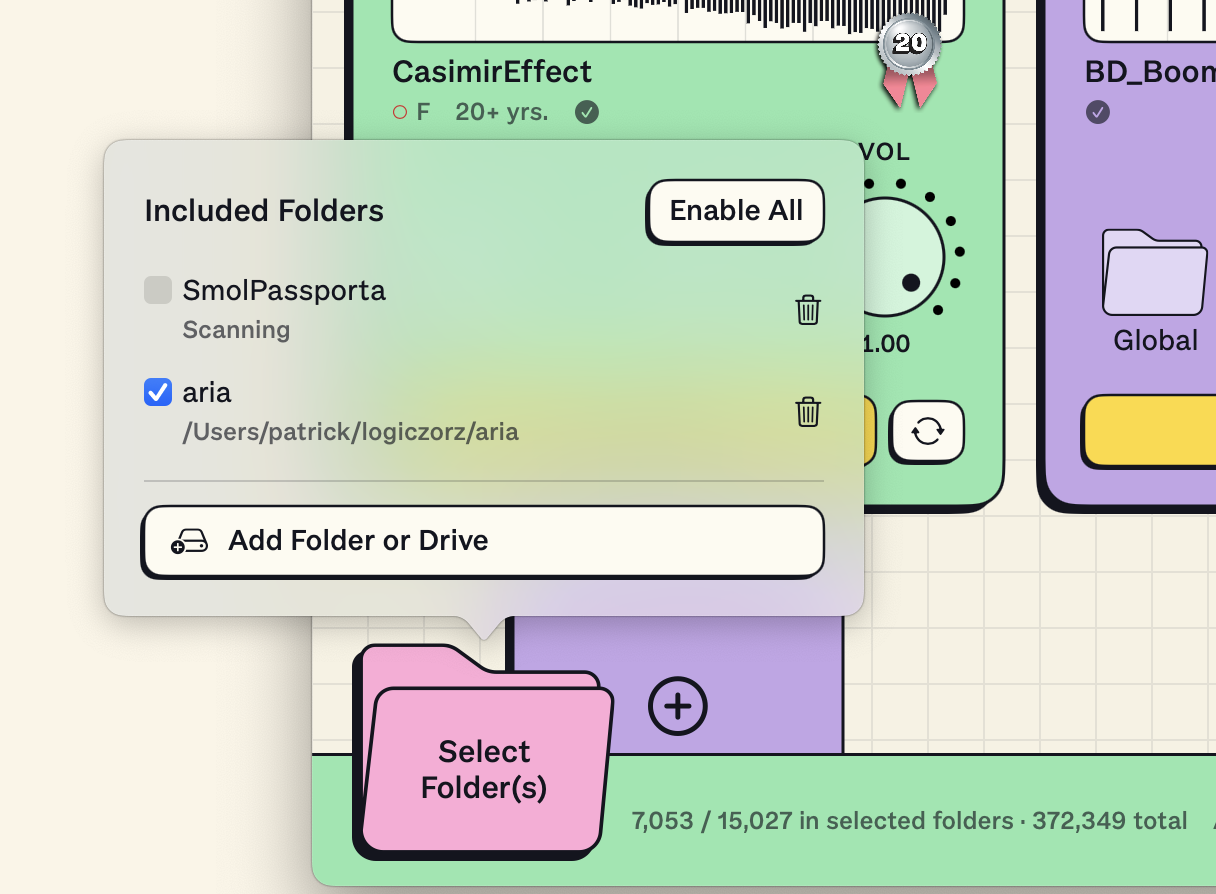
Point at a folder
Select any folder on your Mac and Upcycle starts scanning and analyzing right away. All local, nothing in the cloud.
Your sound
Upcycle time-stretches and pitch-shifts samples into a unified key and tempo — the same proven DSP you know from your DAW — so they fit together immediately.
Re-roll and refine
Sound doesn't work? Re-roll it and keep everything else, or get a fresh batch, or switch up the key and tempo. Re-rolling is lightning fast.
No AI, No Problem
Upcycle uses no AI at all — no generative output, no AI analysis, no AI audio manipulation. The analysis and time-stretching are traditional DSP, and every sound you hear is your own, put together in a fun new way.
Ratings and reviews
4.9
Based on 23 reviews
- 5★87%
- 4★13%
- 3★0%
- 2★0%
- 1★0%
Join the Upcycle Community!
Coming soon: a place to share bloopers, trade flips, swap sample-digging tips and get early builds before anyone else.
Sign up to get an invite when it’s ready.
About Upcycle
Upcycle finds audio on your drives—anywhere on your drives—and assembles it into a song-ready sample. Audio is analyzed in the background, and shifted and stretched to all fit together at the same key and tempo. A guitar loop you recorded years ago, some weird breakbeats you grabbed off the Internet Archive, and a voice memo you recorded last week… it might all just be perfect together.
Once you find something you like, drag the stems to your DAW (or hard drive). You can also export a stereo mix. Save sets of sounds you like, and you can come back to them later (anything you export will also be saved).
System requirements
Mac
macOS 14 (Sonoma) or later
Apple Silicon (M1–M5) only — no Intel
Windows
Windows 10 or 11
64-bit (x64)
One licence works on both Mac and Windows. Internet is only needed to buy, download and update.
Updates
What's new in each version. Upcycle updates itself when you open it.
- Windows! Many of you asked for a Windows version of Upcycle. Grab your .exe now!
- macOS 14 (Sonoma) now supported
- Fix for some hardware configurations where the app could go silent and not play
- Fix for silence after too many rerolls
- Analysis no longer re-runs unnecessarily, especially on external drives
- Better identification of invalid audio files, like macOS-generated placeholders
- Better handling of drum sounds on the chaos/safe slider, very long names, and missing sounds
- Fixed a crash while scanning some folders
- Help → Save Diagnostics Report for troubleshooting
- Type and layout refinements, plus various other bug fixes
FAQ
Is Upcycle really free to try?
Yes. Download the app and use it as long as you like with no account and no time limit. Saving, exporting, and dragging stems into your DAW stay locked until you buy a licence.
What does the licence unlock?
Saving your sessions, exporting audio, and dragging stems straight into your DAW. Everything else is already open in the free demo.
What do I get when I buy Upcycle?
A unique offline licence file (.upcyclekey) plus download links for Mac and Windows. After payment you receive instant links for both by email. If you already installed the demo, just load the licence file to unlock the pro version.
Can I use my licence on both Mac and Windows?
Yes. The same .upcyclekey file works on both platforms, and each licence covers up to 10 computers owned or controlled by you, in any mix of Mac and Windows.
What if I change computers?
Keep your .upcyclekey file safe and import it on the replacement computer. No activation server or machine transfer is required.
How do I get updates?
Upcycle updates itself. The app checks for new versions in the background and shows a prompt with release notes when one is ready, then installs it for you. You can also check manually from the Upcycle menu, or turn automatic checks off in settings.
Do updates cost anything or affect my licence?
Updates within your version are free, and your .upcyclekey licence file keeps working across them, so you never need to re-import it. If we ever release a paid major version, your current version keeps updating as normal.
What is the refund policy?
We offer a 7-day refund if the software does not work on your machine or is not what you expected. A refund may also be granted outside the 7-day period if the product is unused, undownloaded, and the license key has not been used. See our full refund policy in the Terms of Use.
What computers are supported?
Mac: macOS 14 (Sonoma) or later on Apple Silicon (M1–M5) — Intel Macs are not supported. Windows: Windows 10 or 11, 64-bit.
Where does the licence file go on Windows?
The same way as on Mac: open Upcycle and use “Trial — Click to Load License File” in the top right, then choose your .upcyclekey file. There is nothing to type in and no activation server.
Is the Windows version the same as the Mac version?
Yes. Same features, same sound engine, same licence. Both platforms get the same updates automatically when the app starts.
Does Upcycle use AI?
No. Upcycle contains no AI of any kind — no generative AI output, no AI analysis, and no AI audio manipulation. Time-stretching and pitch-shifting work like they do in a DAW, using traditional, well-established DSP. Everything you hear is made from your own samples.
Refund policy
We offer a 7-day refund from the date of purchase if the software does not work on your machine or is not what you expected. A refund may also be granted outside the 7-day period if the product is unused, undownloaded, and the licence key has not been used.
Email help@arialabs.io with your order email and licence key. We may verify download status before approving a refund. Approved refunds are returned to the original payment method.
Read the full terms in Terms of Use and Terms of Sale.
Report a bug or issue
Running into something weird? Email help@arialabs.io from the address you installed or purchased with and send as much detail as you can—what happened, what you expected, and the steps that triggered it. We will get back to you within 48 hours.
New here? Read how Upcycle works as a sample organizer app for macOS.